
NetBird Reverse Proxy: Securely Expose Internal Services to the Internet


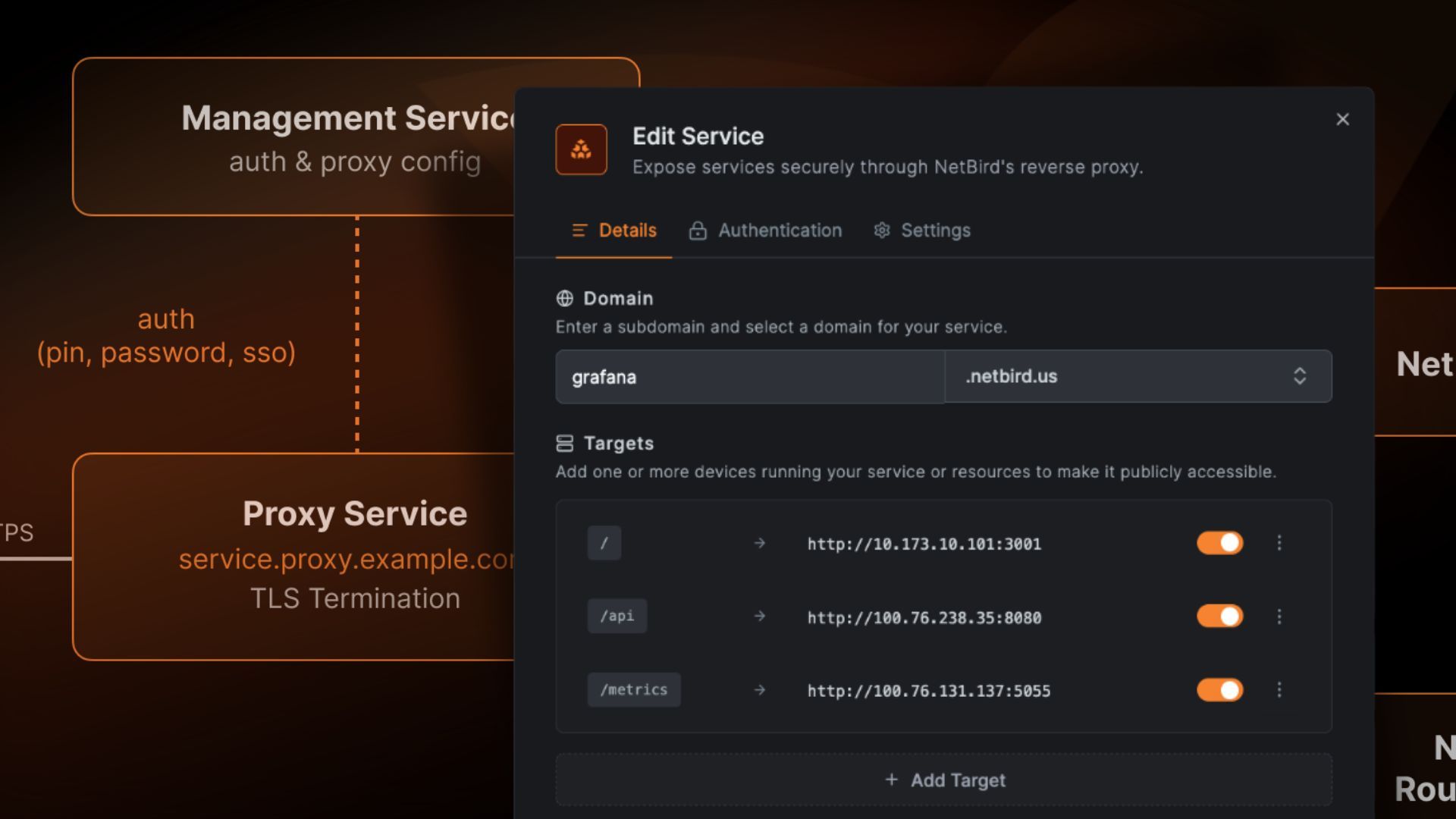
NetBird has released the Reverse Proxy – a feature that fundamentally changes self-hosted setups: Internal services can now be exposed directly to the internet through the WireGuard mesh network, without port forwarding, without firewall rules, with automatic TLS and optional authentication.
💡 Managed NetBird from €34.90/mo – your own instance, unlimited users, hosted in Germany. No per-user fees. Start 7-day free trial →
Table of Contents
- What is the NetBird Reverse Proxy?
- How does it work?
- Authentication: SSO, Password and PIN
- Self-Hosted Setup
- Creating a Service: Step-by-Step
- Path-Based Routing and Multi-Target
- NetBird Reverse Proxy vs. Alternatives
- Use Cases
- Limitations (Beta)
- Our Services
- Further Reading
What is the NetBird Reverse Proxy?
The NetBird Reverse Proxy exposes internal services running on peers or behind network resources to the public internet. NetBird handles:
- TLS termination with automatic Let's Encrypt certificates or custom certificates
- Optional authentication via SSO (OIDC), password, or PIN
- Traffic routing through encrypted WireGuard tunnels to the target service
The target service needs no public IP address and no open ports. It only needs to be reachable within the NetBird network.
Status: The feature is currently in beta and only available for self-hosted deployments. Cloud support is coming soon (Documentation).
How does it work?
The flow for an incoming request:
- Create a service → NetBird provisions a public domain with a TLS certificate
- HTTPS request to the domain → TLS termination at the NetBird proxy cluster
- WireGuard tunnel → The request is forwarded through the encrypted tunnel to the target peer
- Response follows the same path back
Core Concepts
| Concept | Description |
|---|---|
| Service | Configuration unit: maps a public domain to internal targets |
| Target | Destination within the NetBird network: Peer, Host (IP), Domain, or Subnet |
| Domain | Public URL – auto-generated (cluster) or custom domain |
Each service can have multiple targets for path-based routing. Targets support HTTP and HTTPS as backend protocols.
Authentication: SSO, Password and PIN
Each service can be protected with one or more authentication methods:
| Method | Description |
|---|---|
| SSO (Single Sign-On) | Authentication via configured identity provider (OIDC). Optionally restricted to specific groups. |
| Password | Protection with a shared password |
| PIN Code | Protection with a numeric code |
| No authentication | Service is publicly accessible (warning displayed in dashboard) |
Multiple methods can be enabled simultaneously – users choose their preferred method when accessing the service.
For organisations with existing IdP integration (Keycloak, Azure AD, Okta, Google Workspace), SSO is the natural choice: employees authenticate with their existing credentials, and group-based restrictions provide granular access control.
Self-Hosted Setup
Self-hosted deployments require a separate proxy instance (netbirdio/netbird-proxy) that connects to the management server via gRPC.
Prerequisites
- Traefik as reverse proxy (TLS passthrough required – other proxies like Nginx or Caddy do not support this in the required form)
- At least one connected peer or a configured network with resources
- NetBird account with 'Services' permission ('Network Admin' role or higher)
Quick Start
If you deployed NetBird from v0.65.0 onwards using the official setup script (getting-started.sh) with the Traefik option, the proxy container is already included in your Docker Compose stack. Skip straight to creating a service.
For existing deployments, there is a migration guide covering the process: generate an access token, add the proxy container with Traefik labels, set up wildcard DNS.
TLS Certificates
The proxy supports two modes:
ACME (Let's Encrypt):
NB_PROXY_ACME_CERTIFICATES=true
NB_PROXY_ACME_CHALLENGE_TYPE=tls-alpn-01  # or http-01
Static certificates (wildcard or corporate CA):
NB_PROXY_CERTIFICATE_FILE=tls.crt
NB_PROXY_CERTIFICATE_KEY_FILE=tls.key
NB_PROXY_CERTIFICATE_DIRECTORY=./certs
Static certificates support hot-reload – when files change on disk, the proxy picks them up automatically without restart.
High Availability
Multiple proxy instances configured with the same NB_PROXY_DOMAIN value form a cluster. If one instance goes down, the remaining instances continue serving traffic. Each instance independently connects to the management server.
Creating a Service: Step-by-Step
Step 1: Create a Service
In the NetBird dashboard, navigate to Reverse Proxy → Services → Add Service.
Step 2: Configure Details
- Choose a subdomain (e.g.,
grafana) - Select a base domain (cluster domain or custom domain)
- Add a target: type (Peer, Host, Domain, Subnet), protocol (HTTP/HTTPS), port
- Optional: path for path-based routing
Step 3: Authentication
In the "Authentication" tab:
- Enable SSO and optionally restrict to groups
- Set a password and/or PIN
- Or leave all disabled for public access
Step 4: Advanced Settings
In the "Settings" tab:
- Pass Host Header – forward the original Host header to the backend (useful when the application needs to know the public domain)
- Rewrite Redirects – rewrite Location headers in backend responses to replace internal URLs
Step 5: Create the Service
After creation, the service progresses through these statuses:
| Status | Meaning |
|---|---|
pending |
Service is being provisioned |
certificate_pending |
TLS certificate is being issued |
active |
Service is live |
tunnel_not_created |
WireGuard tunnel to target not yet established |
certificate_failed |
Certificate issuance failed |
Path-Based Routing and Multi-Target
A service can have multiple targets with different path prefixes:
| Path | Target | Description |
|---|---|---|
/ |
Peer A (port 3000) | Main web application |
/api |
Peer B (port 8080) | API service |
/docs |
Resource C (port 80) | Documentation |
This consolidates multiple internal services under a single domain – fewer domains, fewer certificates, centralised authentication.
Additionally, the Networks integration provides an "Expose Service" button directly on resources in the Networks view. One click opens the service dialogue with the resource pre-populated as a target.
NetBird Reverse Proxy vs. Alternatives
| Aspect | NetBird RP | Cloudflare Tunnel | ngrok | Pangolin | Nginx/Traefik |
|---|---|---|---|---|---|
| Self-Hosted | Yes | No | No | Yes | Yes |
| Automatic TLS | Yes | Yes | Yes | Yes | Manual/ACME |
| SSO/Auth built-in | Yes (OIDC) | Yes (Access) | Yes (Edge) | Basic Auth | No |
| WireGuard Tunnel | Yes | No | No | Yes | No |
| Mesh VPN integrated | Yes | No | No | No | No |
| Port forwarding needed | No | No | No | No | Yes |
| Open Source | Yes | No | No | Yes | Yes |
| Data sovereignty | 100% | Cloudflare infra | ngrok infra | 100% | 100% |
The key advantage of NetBird: Reverse proxy and mesh VPN come from a single platform. If you already use NetBird for secure network access, you get the reverse proxy without additional infrastructure. With Cloudflare Tunnel or ngrok, traffic flows through external servers – with NetBird, everything stays on your own infrastructure.
Use Cases
Publish Internal Dashboards
Make Grafana, ThingsBoard, or monitoring dashboards accessible to customers or partners – with SSO protection and without requiring a VPN client on the other side.
Share Staging Environments
Share developer previews or QA environments via PIN or password, without setting up VPN access.
Expose IoT Platforms
Securely publish IoT dashboards and APIs running on internal servers – relevant for platforms like merkaio that provide customer access to sensor data.
Receive Webhooks
Internal services can receive webhooks from GitHub, Stripe, or other providers without needing a public IP.
Temporary Demo Access
PIN or password protection enables time-limited access to internal applications – ideal for demos or proof-of-concepts.
Limitations (Beta)
The feature is in beta with the following limitations:
- Self-hosted only: Cloud support has been announced but is not yet available
- Traefik required: Other reverse proxies (Nginx, Caddy, HAProxy) are not supported, as TLS passthrough is required
- No pre-shared key / Rosenpass: Networks relying on these features cannot currently use the reverse proxy
Our Services
As an experienced NetBird partner, we provide setup and operations support:
Managed NetBird including Reverse Proxy
- Self-hosted deployment on Hetzner or your own infrastructure
- Reverse proxy configuration with custom domains and SSO
- Integration with existing identity provider (Keycloak, Azure AD, Okta)
VPN Flatrate
Managed NetBird at a fixed price – unlimited users and devices, no per-seat pricing. Hosted on German servers.
→ VPN Flatrate: Try free for 7 days
Further Reading
- NetBird Reverse Proxy Documentation
- NetBird Installation on Hetzner Cloud
- NetBird vs. Tailscale: Self-Hosted vs. Cloud
- NetBird vs. ZeroTier: WireGuard instead of proprietary
- NetBird vs. Twingate: Self-Hosted or Cloud ZTNA?
- → VPN Hub: All business VPN comparisons
- → Expertise: NetBird
- → Enterprise VPN Flatrate
Frequently Asked Questions
Answers to important questions about this topic
The NetBird Reverse Proxy is a new feature that exposes internal services to the public internet through the WireGuard mesh network. NetBird handles TLS termination, optional authentication (SSO, password, PIN), and routes incoming traffic through encrypted WireGuard tunnels to the target service – without open ports or firewall changes.
No. The target service needs neither a public IP address nor open ports. Traffic is routed through the existing WireGuard tunnel established by the NetBird agent. Only the proxy instance itself requires port 443 (and optionally port 80 for ACME HTTP-01).
The Reverse Proxy supports SSO (Single Sign-On via OIDC with optional group restrictions), password protection, and PIN code. Multiple methods can be enabled simultaneously. A warning is displayed when no authentication is configured.
Currently, the Reverse Proxy is only available for self-hosted deployments (beta). Cloud support has been announced and will be added in a future release.
Yes. In addition to auto-generated cluster domains (subdomain.proxy-domain), custom domains can be configured via CNAME record pointing to the proxy cluster address. All domain types receive automatic TLS certificates.
The NetBird Reverse Proxy is fully self-hosted and open source – all data stays on your own infrastructure. Cloudflare Tunnel routes traffic through Cloudflare's servers. NetBird additionally provides an integrated WireGuard mesh VPN, so reverse proxy and network access come from a single platform.
Written by
Timo Wevelsiep
Co-Founder & CEO
Co-Founder of WZ-IT. Specialized in cloud infrastructure, open-source platforms and managed services for SMEs and enterprise clients worldwide.
LinkedInLet's Talk About Your Idea
Whether a specific IT challenge or just an idea – we look forward to the exchange. In a brief conversation, we'll evaluate together if and how your project fits with WZ-IT.
Trusted by leading companies













Timo Wevelsiep & Robin Zins
CEOs of WZ-IT