




Architecture and migration
Sizing, target environment, data transfer, cutover and recovery are resolved before production operations.

WZ-IT installs and operates RustDesk with dedicated rendezvous and relay components. We configure clients and keys, integrate the solution into your access architecture and handle monitoring, backups and updates.

Companies worldwide trust WZ-IT
The following are trademarks of their respective owners: RustDesk (Purslane Ltd.). WZ-IT is an independent service provider and has no business, partnership, or contractual relationship with these companies. We offer independent migration, installation, hosting, and operations services.
RustDesk is an open-source remote desktop solution with self-hostable rendezvous and relay components. Direct connections, clients, updates and connected services remain separate data and security boundaries.
As an experienced RustDesk integrator, we handle installation, configuration and operation of your self-hosted RustDesk server - on our infrastructure or on-premise at your location.
We install and operate your RustDesk server (hbbs + hbbr) on secure infrastructure in Germany or at your preferred location. Including firewall configuration, TLS setup and client deployment support.
We monitor and update the agreed RustDesk server components. Security and availability also depend on clients, keys, network paths and the concrete configuration.

Your own ID/rendezvous and relay server (hbbs/hbbr) for controllable mediation and relay data flows.

Encrypted connections; the resulting security level depends on key distribution, clients, versions and server configuration.

Clients for Windows, macOS, Linux, iOS, Android and Web - all devices in one solution.

Support for multiple software and hardware codecs; available codecs and performance depend on client, hardware and version.

On Windows, no installation or admin rights required - privilege elevation on demand.

Clear interface for quick remote connections without complicated configuration.
Professional installation on your infrastructure - on-premise, cloud or hybrid
In your data center
AWS, Azure, Hetzner & more
Advanced architecture after technical and licence assessment
Fast remote support for employees and customers without complicated VPN setups
Secure access to office PCs from home with end-to-end encryption
Open-source solution with your own rendezvous and relay server plus documentable data flows
Remote access to Windows, Linux and macOS servers with cross-platform support
Scalable remote desktop solution for IT service providers with custom branding
Screen sharing and remote control for interactive trainings and demos
Secure access and access control for your installation
WireGuard, NetBird or Tailscale
Directly or through an upstream identity layer
Depends on application, edition and identity provider
Fail2Ban, Rate Limiting, IP Whitelisting
We set up secure VPN access to your installation - ideal for remote work and external employees.
Full-service installation with no hidden costs
RustDesk offers TeamViewer alternative with own server. We integrate it into your IT service management processes.
The server API enables device management: Register clients, assign groups, control access rights - all automatable.
A webhook can be triggered on every connection: Audit log, ticket creation, approval workflow.
As open source project, the client can be customized: Own branding, preconfigured servers, additional security features.
How we implement RustDesk development in practice.
Support staff must manually document which computers they accessed. Compliance risk.
Automatic linking: RustDesk session logged with ticket ID. Connection log appears in ticket.
CMDB doesn't contain all devices because registration is manual. RustDesk knows all clients.
Sync service automatically transferring RustDesk clients to CMDB - incl. OS, version, last contact.
Maintenance at night requires access without user confirmation, but standard access is too open.
Time-window-based unattended access with hardware token authentication and automatic session recording.
We do more than provide an application. WZ-IT designs the technical architecture, integrates network and identity, operates the agreed scope and develops integrations when the standard product is not enough.
Sizing, target environment, data transfer, cutover and recovery are resolved before production operations.
SSO, secure access, internal systems and existing security components are integrated appropriately.
Updates, backups, technical monitoring and response paths follow a transparent operational scope.
APIs, automation and custom extensions can be delivered beyond basic deployment.
The exact scope depends on the application, edition, infrastructure and criticality. Vendor licences and non-standard components are quoted separately.
Remote access is designed as a combination of identities, control platform, gateways, routes and traceable access policies.
Employees, service providers and systems receive only the access paths required for their task.
TLS, firewall rules, reverse proxies or private network paths are designed around the platform's exposure.
Local accounts, SSO, directories, service accounts and emergency access are connected through clear roles.
Devices, connections, policies and administrative changes are managed centrally and traceably.
Sites, subnets, relays and outbound tunnels without unnecessarily exposed services.
Least-privilege rules, groups, key rotation and optional technical device criteria.
Controlled access to servers, applications, OT networks and documented events.
The diagram is a resilient target model. Its implementation depends on edition, data flows, load, availability objectives and existing infrastructure.
A clearly defined operating scope instead of an opaque hosting flat fee.
We set up a test instance for you, usually on the next business day. No payment details required. After seven days it is deleted unless you continue.
Compute, applications, storage and response are shown separately. You can see what ongoing operations include and which requirements need a technical assessment.
We also design custom RustDesk architectures, integrations and migrations. Contact us for a technical assessment.
One managed standard RustDesk application is included in the Starter workload. Business and higher levels add a flexible operations allowance for planned work during regular service hours. Select compute, additional applications, storage and the appropriate service level.
A workload is one compute instance with the applications agreed for it.
One standard app per workload is already included. Additional dedicated servers count as separate workloads.
€7.99 excl. VAT per additional 100 GB per month, including daily encrypted offsite backup with 7-day retention. Billing is based on provisioned capacity, not actual usage.
We also implement custom backup schedules and retention periods. For example: daily backups retained for 30 days and one monthly backup retained for 12 months. Scope, storage requirements and additional costs are agreed separately.
+€299 excluding VAT per workload and month
Standard hosting runs on a single instance without high availability. Availability for custom architectures is agreed separately.
Zero downtime on request
Distributed operation with several instances, a database cluster and rolling updates, so that a node failure causes no interruption. Only for applications suited to it; design and price after technical assessment.
This page covers installation and the agreed platform operations for RustDesk. Custom code, the access layer and special confidentiality requirements remain clearly separated responsibilities that can be added when needed.
Maintain the application
Keep custom extensions, interfaces and dependencies controlled, updated and supportable.
from €699.90 excl. VAT / month
View serviceSecure access
Add identity-based access and private network paths as a separate operational layer.
from €349.90 excl. VAT / month
View serviceOperate confidentially
For professional secrecy holders, define contractual, access and infrastructure requirements in a dedicated operating model.
from €499.90 excl. VAT / month
View serviceThree relevant adjacent paths instead of a long list of further products.
All prices are net and exclude statutory VAT. The offers are addressed to businesses.
View the overall systemEnquiry
Briefly describe the current state and objective for RustDesk. We assess infrastructure, integration, and ongoing operations.
Remote support for employees and customers with self-hosted rendezvous and relay services. Direct and relayed connections are configured around network and privacy requirements.
The perfect solution for your individual requirements
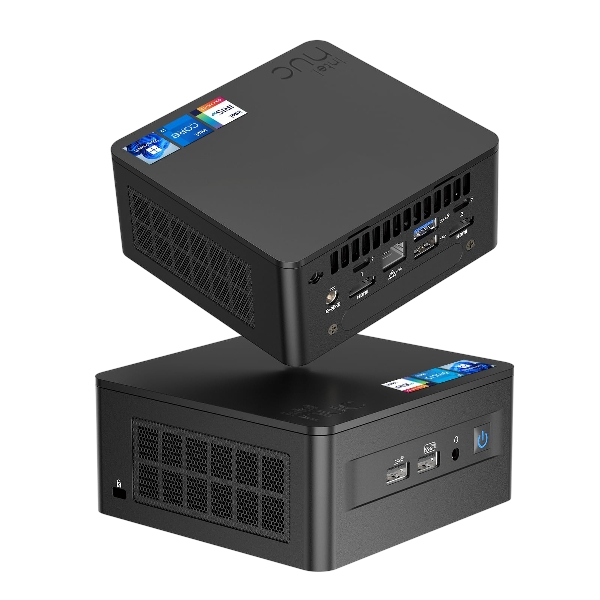
As an alternative to managed hosting in the data centre, WZ-IT provides the hardware, configures RustDesk, and handles hardening, monitoring, updates, backup and technical support. Access can be limited to the internal network or enabled through VPN and existing identities.
from EUR 349 excl. VAT / month · plus one-time provisioning and initial setup
In-depth knowledge from our remote access knowledge base.
Why switching pays off and how to run your own remote desktop server.
Secure remote access to systems - without installing a client.
Remote access via browser: RDP, VNC and SSH without local software.
Roles, permissions and traceability for secure remote access.
Answers to the most important questions
Topics
RustDesk is a remote desktop and remote support solution that allows you to remotely maintain devices over the internet or LAN - including your own server option (self-hosted).
Self-hosting gives you control over connection setup/relay, infrastructure location and operational processes (firewall, updates, monitoring). This is particularly interesting for companies with data protection, latency or control requirements.
Typically two server services: hbbs = ID/rendezvous server (clients find each other through it) and hbbr = relay server (if no direct P2P connection is possible).
In the client under Menu → Network, enter the ID Server (hbbs host/IP); the Relay Server refers to hbbr (typically port 21117).
For encrypted connections, clients need to know your server's public key. The key is generated on first start and is usually located as id_ed25519.pub in the working/data directory.
Yes. The RustDesk documentation describes several ways: manually, via import/export of server configuration, and automated deployment via scripts/config string.
The API server is only relevant for RustDesk Pro (e.g., web console/login). For classic open-source self-hosted setups, many teams leave it empty.
The official documentation mentions TCP 21115-21119 and UDP 21116 (depending on use/setup). Also plan DNS/domain/reverse proxy according to your environment.
Both work. For productive setups, a domain is practical (clients, certificates, failover scenarios). In LAN/closed network environments, a fixed IP can also make sense.
Yes - but there's a common issue: NAT loopback. If server and clients are on the same LAN, they either need to use the local server IP or enable NAT loopback on the network.
This is a classic NAT loopback problem. The documentation mentions three solutions: NAT loopback on router, local DNS (e.g., AdGuard/Pi-hole) or hosts file rules.
Not necessarily. RustDesk attempts direct connections depending on network situation; if that doesn't work (firewall/NAT), hbbr can step in as relay.
Yes - a reverse proxy for domain/certificates/ingress policies is common. It's important to correctly map port and protocol requirements (TCP/UDP).
With self-hosting, you control the infrastructure components (hbbs/hbbr). You should also define in your operations concept what you log (e.g., connection logs) and for how long.
For small environments, a lean VM/instance is often sufficient; bandwidth/latency (especially for relay usage) and clean firewall rules are decisive.
Best practice: Define maintenance windows, test versions in staging first, have a rollback plan (snapshots/VM backups), then deploy to production. With Docker: pin images instead of 'latest'.
Typical: minimal port openings, expose server only behind firewall/VPN (if possible), restrict admin access, enable logs/monitoring, regular updates & restore tests.
Yes, depending on organizational structure: separate servers per location/tenant or a central server with clear policy. It's important to document data flows and responsibilities clearly.
The bottleneck is usually relay traffic (bandwidth/CPU), not the ID server. Scaling is done through better uplink capacity, separate relay servers, location proximity and clean network rules.
Most common: incorrectly opened ports/protocols (TCP vs. UDP), NAT loopback in LAN, missing key in client, and reverse proxy setups that don't correctly map UDP.
More questions? We are happy to help!
These solutions are often used together with RustDesk
These solutions offer similar functionalities and can be evaluated together
No risk: worst case, you leave with a clearer understanding of your project than before.


“WZ-IT's advice on our Azure migration was technically sound and completely non-binding right from the intro call - we took away a great deal.”










“WZ-IT moved our studio infrastructure from decentralised individual devices to a central platform: every site is securely connected via VPN, new devices are onboarded automatically and an entire site is provisioned from a template, without manual steps on location. What impressed me most is the breadth and depth of their knowledge: Timo and Robin are not a typical IT provider who sets up a server and leaves. The two of them think their way into highly complex infrastructure and software topics, work through every requirement we put in front of them, and build networking, provisioning and operations so that everything fits together in the end. WZ-IT is an excellent partner for complex software, network and architecture projects.”

Steve Kirchner
Managing Director, nextGYM GmbH


“Professional, honest and technically thoroughly sound: WZ-IT set up our Proxmox and backup infrastructure securely and future-proof. The consulting from Timo and Robin was objective and needs-driven, the implementation smooth and the final documentation exemplary. You can tell immediately that business-critical infrastructure is thought through holistically from the outset here and implemented with clear ownership.”
Pascal Block
Project Manager, Stadtwerke Brühl GmbH
Stadtwerke Brühl - municipal energy and infrastructure utility.

“Communication with WZ-IT was open, friendly and professional from the very beginning. Mr. Wevelsiep and Mr. Zins responded to every one of our questions patiently, promptly and respectfully, and contributed their own suggestions and good ideas on how to modernize our server infrastructure and adapt it even better to our needs. Throughout, WZ-IT consistently kept our need for data sovereignty and GDPR compliance in mind. Even short-notice adjustments and change requests from our side were implemented quickly and patiently and integrated consistently into the overall concept. From planning to the final handover, every step was documented transparently and comprehensively - so if a provider change should ever become necessary, the documentation would let us onboard a successor into our infrastructure very quickly. We are extremely satisfied with WZ-IT and hope to continue working together for a long time.”
Christoph Mußmann
Project Officer, DGHO e.V.
DGHO - German Society for Hematology and Medical Oncology.

“I got to know Timo and Robin as dedicated and professional partners who make a lot of things possible for their clients that initially seem impossible. I felt very well advised. The services offered have thoroughly convinced me. (translated)”
Andrea Pawlowski
Communications Manager, Golem.de
Golem.de - leading German IT news outlet.

“While looking for a partner to integrate a local AI solution, we came across Timo and Robin - and could not have made a better decision. They quickly understood our requirements and solved technical challenges competently and pragmatically. We were particularly impressed by the straightforward collaboration, their high level of expertise and the speed of implementation. We are delighted to have Timo and Robin at our side as reliable business partners and look forward to our next projects together. (translated)”
Henrik Jeche
Head of IT Administration
ml&s - full-service provider for the electronics industry.


“With Timo and Robin, you're not only on the safe side technically - you also get the best human support! Whether it's quick help in everyday life or complex IT solutions: the guys from WZ-IT think along with you, act quickly and speak a language you understand. The collaboration is uncomplicated, reliable and always on an equal footing. That makes IT fun - and above all: it works! Big thank you to the team! (translated)”
Sonja Aßer
Data Manager, ARGE
ARGE Neue Medien - master data & digital standards for plumbing and building technology.

“I recently worked with Timo and the WZ-IT team, and honestly, it turned out to be one of the best tech decisions I have made for my business. Right from the start, Timo took the time to walk me through every step in a simple and calm way. No matter how many questions I had, he never rushed me. The results speak for themselves. With WZ-IT, we reduced our monthly expenses from $1,300 down to $250. This was a huge win for us.”
Aleksandr Shuliko
CTO, EVA Real Estate
EVA Real Estate - leading real-estate agency in Dubai.


“WZ-IT manages our Proxmox cluster reliably and professionally. The team handles continuous monitoring and regular updates for us and responds very quickly to any issues or inquiries. They also configure new nodes, systems, and applications that we need to add to our cluster. With WZ-IT's proactive support, our cluster and the business-critical applications running on it remain stable, and high availability is consistently ensured. We value the professional collaboration and the noticeable relief it brings to our daily operations.”
Pascal Hakkers
Aphy AG
Aphy AG - AI platform for hotel back-office.


“WZ-IT provided very competent support in implementing our server and virtualization infrastructure. As part of the project, a Proxmox-based virtualization environment was set up along with a virtual machine for our application systems. Additionally, a structured backup concept was implemented. A particular focus was on security: the setup of a VPN tunnel and the clean implementation of encryption and access concepts were professionally executed. The structured consulting as well as the reliable and swift implementation deserve special mention. We are very satisfied with the services provided and are happy to recommend WZ-IT.”
John Hellmerichs
Managing Director, AInergy GmbH
AInergy - consultancy for energy and facility management.


“We have had very good experiences with Mr. Wevelsiep and WZ-IT. The consultation was professional, clearly understandable, and at fair prices. The team not only implemented our requirements but also thought along and proactively. Instead of just processing individual tasks, they provided us with well-founded explanations that strengthened our own understanding. WZ-IT took a lot of pressure off us with their structured approach - that was exactly what we needed and is the reason why we keep coming back. (translated)”
Matthias Zimmermann
Managing Director, Annota GmbH
Annota - healthtech startup with an AI documentation assistant.

“Timo and Robin from WZ-IT set up a RocketChat server for us - and I couldn't be more satisfied! From the initial consultation to the final implementation, everything was absolutely professional, efficient, and to my complete satisfaction. I particularly appreciate the clear communication, transparent pricing, and the comprehensive expertise that both bring to the table. Even after the setup, they take care of the maintenance, which frees up my time enormously and allows me to focus on other important areas of my business - with the good feeling that our IT is in the best hands. I can recommend WZ-IT without reservation and look forward to continuing our collaboration! (translated)”
Sebastian Maier
Managing Director, Yonju GmbH
Yonju - business coaching and AI products.


“Counting on WZ-IT team was crucial, their expertise and solutions gave us the pace to deploy in production our services, even suggesting and performing improvements over our configuration and setup. We expect to keep counting on them for continuous maintenance of our services and implementation of new solutions.”
Gabriel Sanz Señor
Managing Director, Odiseo Solutions
Odiseo Solutions - software engineering for the space industry.


“WZ-IT supported us professionally with the provisioning and setup of NetBird. Alongside the technical implementation, we also received well-founded advice on connecting our Kubernetes clusters. The recommendations were concrete and directly actionable. The collaboration was consistently reliable, fast and on equal terms. We can recommend WZ-IT without reservation.”
Kai Clauß
Head of Development, SweetConnect GmbH
SweetConnect - cross-manufacturer Industry 4.0 platform for confectionery production.

Whether a specific IT challenge or just an idea - we look forward to the exchange. In a brief conversation, we'll evaluate together if and how your project fits with WZ-IT.
Companies worldwide trust WZ-IT


