Which platform fits your application? WZ-IT assesses the platform and operating responsibilities: managed Coolify or Kubernetes design and operations.
Docker Compose, Coolify and Kubernetes are not three quality levels of the same solution. They operate at different abstraction layers and fit different operating models:
- Docker Compose describes an application made of several containers and normally runs it on one Docker system.
- Coolify adds a self-hosted platform interface on Docker infrastructure and automates Git deployments, domains, TLS and many application tasks.
- Kubernetes is a distributed orchestration API for clusters, workloads and shared platform standards.
The best option is not the one with the most features. It is the smallest one that reliably supports availability, delivery, security and growth.
Contents
- The three models in one sentence
- Docker Compose: direct and controllable
- Coolify: a self-hosted application platform
- Kubernetes: a distributed platform API
- Docker Compose vs Kubernetes vs Coolify compared
- Production operations and high availability across the three models
- Which platform fits which scenario
- Switch without a big bang: from Compose to Coolify or Kubernetes
- Our decision logic
The three models in one sentence
| Model | Core idea | Common use |
|---|---|---|
| Docker Compose | declared containers for one stack on a Docker system | a few applications, small team, direct control |
| Coolify | self-hosted PaaS-like user and delivery layer on Docker | several apps, Git deployments, limited platform staffing |
| Kubernetes | declarative, distributed orchestration and platform API | many workloads, multiple teams, clusters, policies and scaling |
Docker Compose can also be a suitable foundation for stable and well-bounded systems within larger organizations. Conversely, Kubernetes does not automatically make an application resilient or secure.
Docker Compose: direct and controllable
The Docker Compose documentation describes Compose as a tool for defining and running multi-container applications. A YAML file combines services, networks, volumes, environment variables and dependencies. One command starts the complete stack.
Strengths
- small learning and operating surface,
- transparent relationship between host, containers, ports and volumes,
- similar developer and server workflows,
- extensive Docker ecosystem,
- straightforward backup and recovery when volumes are structured well,
- very few additional platform components.
Limits
- no scheduler across several hosts,
- no built-in cluster control loop that restarts workloads elsewhere after host failure,
- rollouts, secrets, policies and cross-host networking require additional tools or processes,
- self-service and multi-team separation are not central to the model.
Compose is especially suitable when an application can run reliably on a defined host or a small number of deliberately separated hosts. Redundancy can be added externally, but Compose does not orchestrate it.
Coolify: a self-hosted application platform
Coolify is an open-source platform that manages servers over SSH and deploys applications on Docker. It connects Git repositories, buildpacks or Dockerfiles with deployments, domains, automatic TLS, environment variables and a web interface. A catalog of prepared services simplifies many open-source application deployments.
Strengths
- Git-based delivery without building a custom platform interface,
- preview deployments and automated builds,
- domains, reverse proxy and TLS are integrated,
- a user interface for developers and administrators,
- several servers can be managed from one Coolify instance,
- self-hosted on Proxmox, Hetzner, OVHcloud or private hardware.
Limits
Coolify remains a Docker-based platform at its core. Its multiple-server documentation makes clear (as of October 2026) that additional servers do not distribute traffic by themselves and do not yet form a complete highly available system: a load balancer with health checks, DNS, firewall rules and shared data and session storage must be set up separately. In addition, Docker Compose applications and applications with persistent storage cannot be spread across further servers. The central Coolify instance manages destination servers, but it does not replace Kubernetes' complete scheduling, policy and controller model.
That is not an inherent weakness. It is exactly why Coolify is easier to understand and less expensive to operate for many teams.
We operate Coolify for customers and use it for our own applications. Coolify operations includes updates, backups and monitoring. See the PaaS comparison for alternatives.
Kubernetes: a distributed platform API
Kubernetes manages workloads through a shared cluster API. Schedulers and controllers distribute Pods and continuously reconcile desired with actual state. Deployments, Services, StatefulSets, Jobs, RBAC, NetworkPolicies and extensions create a broad platform foundation.
Strengths
- orchestration across multiple nodes,
- declarative rollouts and self-healing,
- standardized API for platform automation and GitOps,
- horizontal scaling and flexible placement constraints,
- namespaces, RBAC, quotas and policies for multiple teams,
- large networking, storage, security and observability ecosystem,
- portability across Proxmox, bare metal, European clouds and EKS, AKS or GKE.
Limits
- substantially more components and interactions,
- recurring cluster and add-on upgrades,
- more complex troubleshooting across application, Pod, node, CNI, ingress and storage,
- higher monitoring, security and on-call requirements,
- stateful workloads need explicit storage and backup architecture.
What is Kubernetes? explains the foundation. Do we need Kubernetes? helps assess whether those extra capabilities are justified.
Docker Compose vs Kubernetes vs Coolify compared
| Criterion | Docker Compose | Coolify | Kubernetes |
|---|---|---|---|
| Entry effort | low | low to medium | high |
| Primary layer | application stack | app delivery on Docker | cluster and platform API |
| Web interface | no | yes | depends on add-ons |
| Git deployments | add CI/CD | integrated | CI/CD or GitOps |
| Multiple hosts | manually separated stacks | centrally managed target servers | native cluster model |
| Scheduler | no | platform-directed Docker/server placement | yes |
| Self-healing | container restart on one host | Docker and platform mechanisms | controllers across nodes |
| Rolling updates | custom process | platform-assisted | native workload controllers |
| Autoscaling | external | limited/custom automation | HPA/VPA and cluster autoscaling |
| Team separation | environments/hosts | projects, teams and roles | namespaces, RBAC, quotas, policies |
| Network policy | host/firewall based | Docker networks and external rules | CNI-backed NetworkPolicies |
| Persistent storage | volumes/bind mounts | Docker volumes and storage targets | CSI, StorageClasses, PVCs |
| Platform overhead | low | medium | high |
“Native” does not mean “automatically correct.” A Kubernetes HPA only scales well with appropriate metrics, resource requests and application behavior. A StatefulSet is not a database backup.
Production operations and high availability across the three models
| What the tool also needs | Operations responsibility |
|---|---|
| Backups and restore tests | Back up data and platform configuration; verify recovery |
| Monitoring | Monitor hosts, platform and application; assign alert ownership |
| Updates | Update hosts, images and platform in a controlled way |
| Secrets | Define access, storage and rotation |
| Host failure | Test recovery or failover with data dependencies |
The most common bad decision starts by equating “several containers” with “highly available.”
Compose
A container can restart after a process failure. If the host fails, external virtualization HA, a prepared second host or a recovery process is required. For many business systems, a clear RTO with Proxmox HA and backups is more economical than a complete Kubernetes stack.
Coolify
Coolify can manage several servers and simplify deployments. A highly available overall architecture still includes load balancers, redundant destination systems, data storage and the platform's control components. Those elements require explicit design.
Kubernetes
Kubernetes can reschedule workloads after node failures if sufficient independent nodes, networking and available storage remain. A highly available control plane, several failure domains and an application with multiple replicas are separate requirements. Three Kubernetes VMs on one hypervisor do not make the overall system highly available.
Which platform fits which scenario
Small internal business application
Likely choice: Compose or Coolify. Few components, simple ownership and acceptable maintenance windows rarely justify a cluster.
Agency or product team with several web applications
Likely choice: Coolify can combine Git deployment, domains and TLS with manageable effort. Kubernetes becomes relevant as team separation, complex delivery and distributed resilience become more important.
SaaS with several APIs, workers and environments
Likely choice: evaluate Kubernetes. Frequent rollouts, multiple workloads, scaling and standardized policy can justify the platform overhead.
Existing legacy application
Application modernization is the starting point for legacy applications. Kubernetes application modernization covers the path to a cluster.
Likely choice: containerize and organize operational dependencies first. Compose is often the best intermediate or permanent solution. Choose Kubernetes only if the target requirements demand it.
Sovereign multi-tenant platform
Likely choice: Kubernetes on Proxmox or European infrastructure when namespaces, policies, separated teams and standardized delivery are genuinely required. For a few tenants, deliberate VM or Coolify isolation may be simpler and more strongly isolated.
Middle path: k3s instead of a full-size cluster
Compare k3s, RKE2 and Talos when choosing a distribution. k3s reduces the installation footprint, while Kubernetes responsibilities for storage, updates and recovery remain.
Switch without a big bang: from Compose to Coolify or Kubernetes
The platform decision is not permanent. Clean containerization preserves options.
From VM to Compose
The application and its dependencies move into images, configuration is externalized, data moves into defined volumes or external services and health checks are added. Delivery and backup become reproducible.
From Compose to Coolify
Existing Dockerfiles and repositories can often be reused. Coolify handles build, delivery, domains and certificates. Volumes, databases and dependencies still need to be assessed before migration.
From Compose or Coolify to Kubernetes
Container images normally remain usable, but the operating definition changes. Compose services become Deployments or StatefulSets, Services, ConfigMaps, Secrets, PVCs and policies. Ingress or Gateway, storage, observability and an upgrade process are also required. Automatically converting a file does not replace this architecture work.
Our decision logic
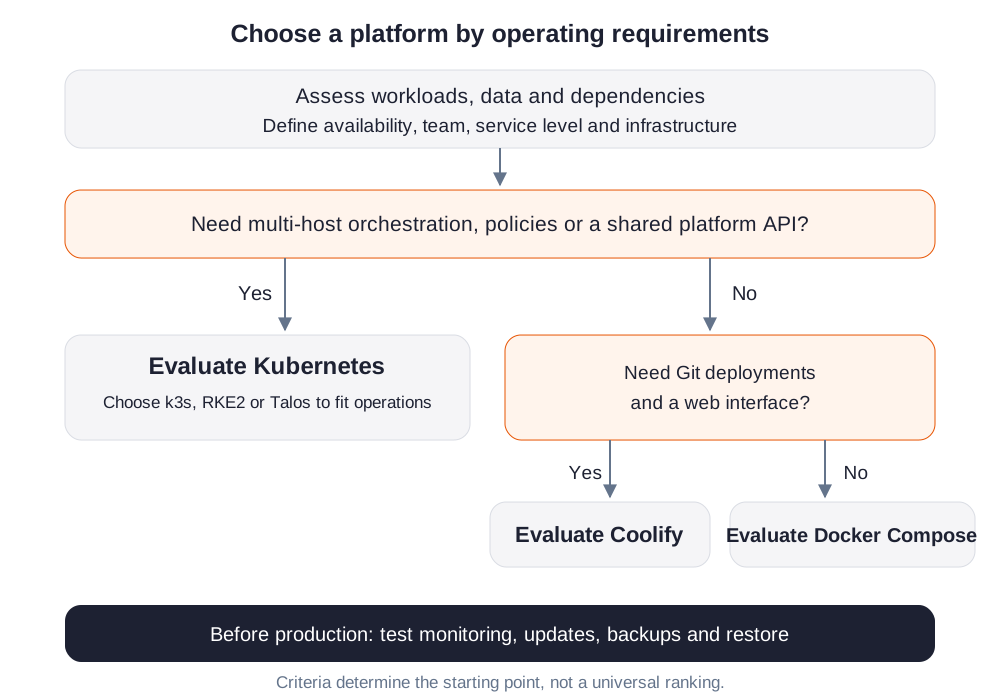
WZ-IT makes the decision in this order:
- Workload: understand state, data, protocols, scaling and dependencies.
- Operating objective: define availability, RTO/RPO, delivery frequency and security.
- Organization: assess teams, roles, platform expertise and service levels.
- Infrastructure: consider public cloud, European providers, Proxmox or on-premises.
- Choose the smallest suitable platform: Compose, Coolify or Kubernetes.
- Prove the lifecycle: test monitoring, upgrades, backup and restore before production.
These criteria produce a documented target model. When a cluster fits, we integrate the platform, private NetBird access and managed operations.
Conclusion
Docker Compose maximizes simplicity and direct control. Coolify adds a productive self-service and delivery layer for Docker applications. Kubernetes provides a distributed platform API for more extensive automation, resilience and governance.
All three are tools in the same modernization toolbox. Selection follows the application, availability objectives, delivery process, scaling requirements and available operational capacity.
For an agreed transition, follow the Compose-to-Kubernetes guide with Kompose.