
Open WebUI vs. AnythingLLM: The detailed comparison for self-hosted LLM interfaces


Editorial note: The information in this article was compiled to the best of our knowledge at the time of publication. Technical details, prices, versions, licensing terms, and external content may change. Please verify the information provided independently, particularly before making business-critical or security-related decisions. This article does not replace individual professional, legal, or tax advice.
Want Open WebUI ready for staff, not merely installed?
AI Cube Pro brings Open WebUI, an agreed local model, hardening, initial setup and support into your organisation as a prepared AI platform. On existing infrastructure, we alternatively handle Open WebUI installation, integration and operations.
Explore AI Cube Pro · Have Open WebUI operated · Schedule an initial consultation
The use of Large Language Models (LLMs) such as GPT-4, Claude or Llama has evolved from experimental applications to mission-critical tools in recent years. However, while cloud-based solutions such as ChatGPT Plus or Claude Pro are easily accessible, they pose considerable challenges for companies: Lack of data control, unclear data processing in third countries and compliance risks under GDPR are just some of the concerns.
This is where self-hosted LLM interfaces come into play. They enable companies to use powerful AI models without passing on sensitive data to external providers. Two of the most popular open source solutions in this area are Open WebUI and AnythingLLM.
In this detailed comparison, we analyze both platforms in terms of installation, features, RAG (Retrieval Augmented Generation) capabilities, data protection and business suitability. The aim is to provide IT decision-makers and developers with a sound basis for selecting the right solution.
Table of Contents
- Brief Overview of Both Tools
- Comparison of Core Criteria
- Strengths & Weaknesses in Detail
- Suitability for Enterprise Use / Use Case Recommendations
- Recommendations & Conclusion
- Outlook & Related Topics
- Contact Us
- References
Brief Overview of Both Tools
Open WebUI
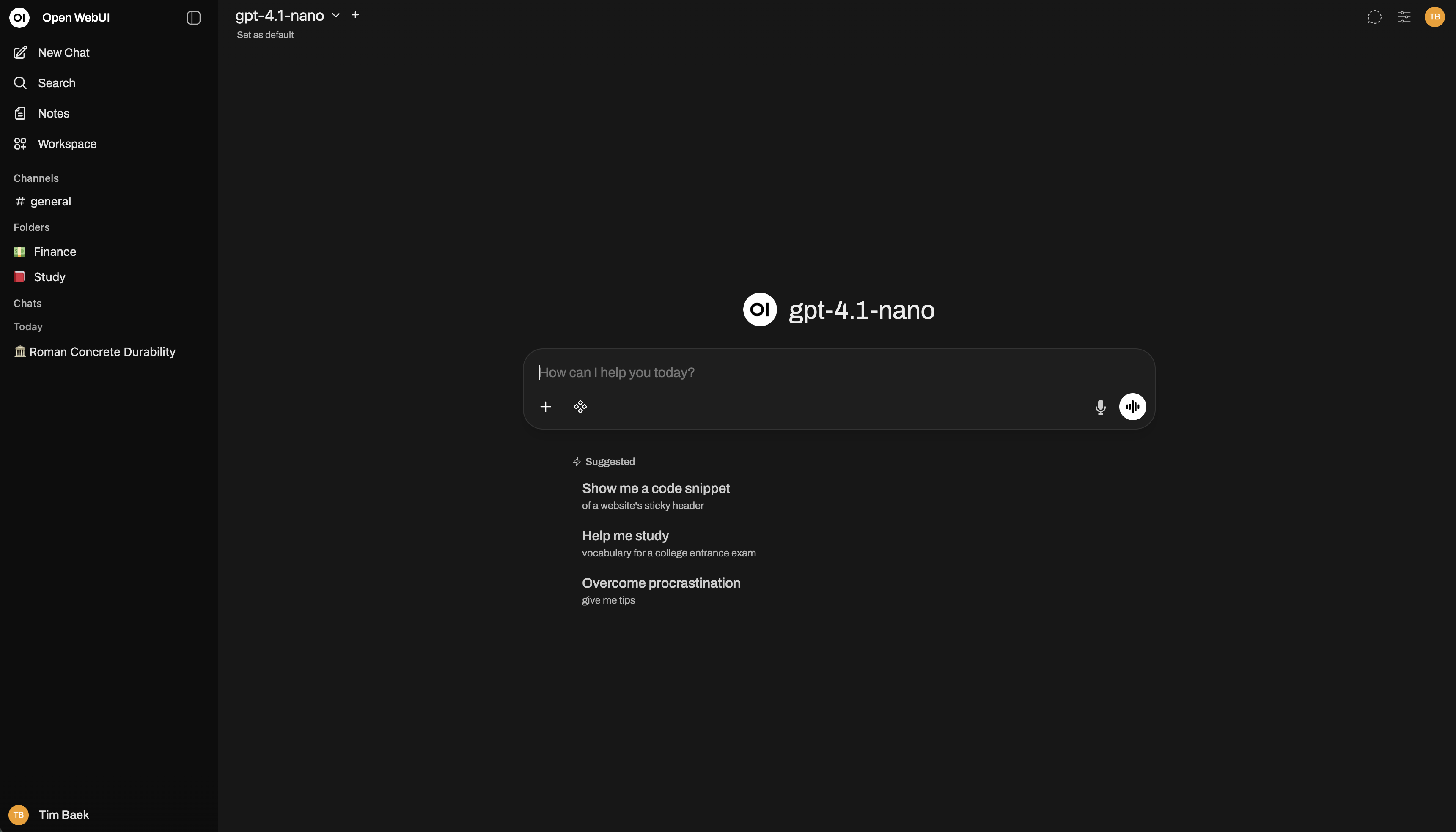
Open WebUI (formerly Ollama WebUI) is a self-hosted web interface for LLMs that was primarily developed for integration with Ollama, but also supports other LLM providers such as OpenAI, Claude or local models.
Manufacturer & Licensing Model: Open WebUI is a community-driven project and the source code is public on GitHub. The licence, however, is not MIT: since 2025 the project ships its own "Open WebUI License" - BSD-3-Clause plus a branding clause. Clause 4 explicitly prohibits removing, altering or obscuring the "Open WebUI" branding. It is permitted only in three cases: with at most 50 end users in any rolling 30-day period, with written permission from the copyright holder, or under an enterprise licence. Anyone planning to roll the interface out under their own brand has to account for that.
Architecture & Deployment Scenarios: The platform is based on a modern stack with Python (FastAPI) in the backend and Svelte in the frontend. Open WebUI can be installed as a Docker container, via Kubernetes or natively. It is particularly suitable for developers and teams who need a flexible, extensible ChatGPT-like interface for local or self-hosted models.
Technological Basis & Community: With over 45,000 GitHub stars (as of November 2025), Open WebUI has a very active community. Development is progressing rapidly, with regular updates and an extensive plugin system. The platform supports RAG, document upload, web search and multimodality (image processing). For enterprise use with real access rights - for example connected to Nextcloud - what matters is that permissions are enforced before the vector search; our guide Connecting Open WebUI to Nextcloud: RAG with ACLs shows how.
Main Advantages:
- Native integration with Ollama for local models
- Extensive RAG functionality with vector database support
- Plugin system for extensions
- ChatGPT-like user interface
- Active developer community
Possible Limitations:
- Primarily designed for technically experienced users
- Installation can be complex without Docker knowledge
- Fewer business features such as team management or role concepts (compared to enterprise solutions)
Learn more: Open WebUI Installation and Managed Hosting at WZ-IT
AnythingLLM
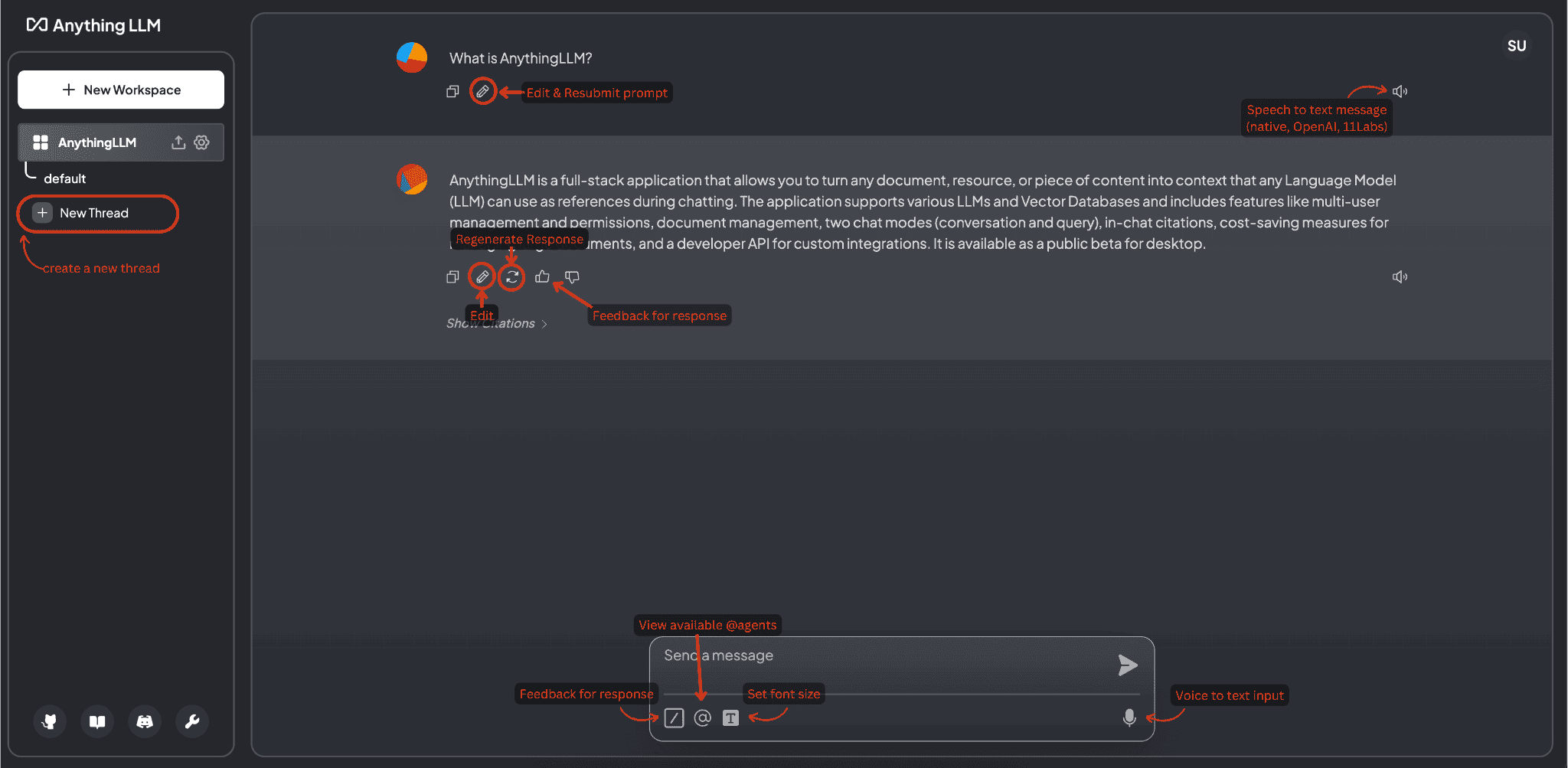
AnythingLLM positions itself as an "All-in-One AI Desktop & Docker Solution" that makes it possible to work with different LLMs, process documents and build your own RAG system - both as a desktop application and as a server installation.
Manufacturer & Licensing Model: AnythingLLM is developed by Mintplex Labs and is available under MIT license. It is available as open source on GitHub.
Architecture & Deployment Scenarios: AnythingLLM offers two deployment modes: as a desktop application for Windows, macOS and Linux and as a Docker-based server installation. The stack is based on Node.js/Express in the backend and React in the frontend. The platform aims to provide not only developers but also business users with an easy entry into self-hosted LLM use.
Technological Basis & Community: With over 25,000 GitHub stars, AnythingLLM has a growing community. The platform places particular emphasis on user-friendliness and business functions such as workspace management, team collaboration and granular access control.
Main Advantages:
- Desktop version for easy access without server setup
- Comprehensive workspace management for teams
- Integrated vector database support (Pinecone, Chroma, Weaviate, etc.)
- Business-oriented features (roles, permissions, API keys)
- Simple document management with drag & drop
Possible Limitations:
- Smaller community than Open WebUI
- Desktop version limited to local use (no team sharing)
- Less plugin ecosystem compared to Open WebUI
Learn more: AnythingLLM Installation and Managed Services at WZ-IT
Comparison of Core Criteria
| Criterion | Open WebUI | AnythingLLM |
|---|---|---|
| License | Open WebUI License (BSD-3 + branding clause above 50 users) | MIT |
| Primary Target Group | Developers, Self-Hosters, Ollama Users | Business Users, Teams, Enterprises |
| Deployment | Docker, Kubernetes, Native Installation | Desktop App + Docker/Server |
| LLM Providers | Ollama, OpenAI, Claude, Mistral, Local | OpenAI, Claude, Ollama, Local, many more |
| RAG Capabilities | Yes, with ChromaDB, Qdrant, Milvus | Yes, with Pinecone, Chroma, Weaviate, LanceDB |
| Document Upload | Yes (PDF, TXT, DOCX, etc.) | Yes (PDF, TXT, DOCX, XLSX, CSV, etc.) |
| Web Search | Yes (via plugins) | Yes (integrated) |
| Multi-User Support | Yes (with authentication) | Yes (with workspaces & roles) |
| API Access | REST API | REST API + Developer API |
| Plugins/Extensions | Extensive plugin system | Limited, focus on core features |
| Workspace Management | Basic features | Extended (teams, projects, roles) |
| Installation Complexity | Medium (Docker knowledge recommended) | Low (Desktop) / Medium (Server) |
| User Interface | ChatGPT-like, developer-oriented | Business-friendly, intuitive |
| GDPR Compliance | Yes (with self-hosting) | Yes (with self-hosting) |
| Community Size | Very large (45k+ GitHub Stars) | Large (25k+ GitHub Stars) |
| Costs (Self-Hosted) | Free (infrastructure only) | Free (infrastructure only) |
Strengths & Weaknesses in Detail
Open WebUI
Strengths:
-
Native Ollama integration: Open WebUI was originally developed for Ollama and offers the best integration for local models. Model management, updates and execution are seamless.
-
Extensive plugin system: The platform has a growing ecosystem of plugins that add features such as web search, code execution, image generation and more.
-
Active development: With several updates per week, Open WebUI is one of the fastest developing LLM interfaces. New features such as function calling, vision support and extended RAG functions are continuously being added.
-
RAG flexibility: Supports various vector databases (ChromaDB, Qdrant, Milvus) and offers advanced settings for chunking, embedding models and retrieval strategies.
-
Developer-friendly: Clear API documentation, simple integration into existing workflows and extensive configuration options.
Weaknesses:
-
Steep learning curve for non-developers: Installation and configuration requires technical understanding. Without knowledge of Docker, getting started can be challenging.
-
Limited business features: Team management, granular authorizations and audit logs are less sophisticated than business-oriented solutions.
-
Documentation: Although extensive, the documentation is sometimes fragmented, and specific use cases often need to be researched in GitHub issues or community forums.
-
Resource intensity: When using local models with RAG, the hardware requirements (RAM, GPU) can be considerable.
AnythingLLM
Strengths:
-
Desktop version: The desktop app allows you to get started immediately without a server setup. Ideal for individual users or initial experiments with self-hosted LLMs.
-
Business features: Workspace management, team collaboration, role-based access control and API key management make AnythingLLM particularly suitable for enterprise deployments.
-
User-friendliness: The interface is intuitively designed and is explicitly aimed at business users. Document upload via drag & drop, simple workspace creation and a clear navigation structure make it easy to use.
-
Versatile LLM support: AnythingLLM supports a wide range of LLM providers out-of-the-box, from cloud APIs to local models (Ollama, LM Studio, LocalAI).
-
Built-in vector databases: Support for numerous vector databases, including cloud solutions (Pinecone) and self-hosted options (Chroma, Weaviate, LanceDB).
-
RAG optimization: Advanced settings for RAG, including document processing, automatic chunking and embedding management.
Weaknesses:
-
Smaller community: Compared to Open WebUI, the community is smaller, which can lead to fewer community plugins and slower feature development.
-
Limited expandability: The plugin system is less mature. Customizations often require direct code access.
-
Desktop vs. server split: The desktop version does not offer all the features of the server version (e.g. multi-user support), which can lead to confusion.
-
Documentation for advanced users: While basic use is well documented, some guides for advanced setups (e.g. high availability, complex RAG pipelines) are missing.
Suitability for Enterprise Use / Use Case Recommendations
When to choose Open WebUI?
Open WebUI is particularly suitable for:
-
Developer teams with Ollama focus: If you primarily want to use local models via Ollama and need a ChatGPT-like interface.
-
Tech-savvy organizations: Teams with DevOps resources looking for a highly customizable solution and willing to invest time in setup and maintenance.
-
RAG-Heavy Workflows: Projects that require complex RAG pipelines with multiple vector databases, custom embeddings and fine-tuning.
-
Plugin-driven extensions: If you need a platform that can be extended by plugins (e.g. web scraping, code execution, custom APIs).
-
Open source first strategy: Companies that prefer open source solutions and want to actively contribute to the community.
Example use case: A software development team wants to carry out code reviews with a locally hosted Llama 3 model that has been trained to internal coding standards. Open WebUI with RAG via the internal code documentation offers the necessary flexibility here.
When to choose AnythingLLM?
AnythingLLM is particularly suitable for:
-
Business teams without dedicated DevOps: Organizations that need a user-friendly solution that can also be used by non-technical employees.
-
Multi-workspace scenarios: Companies with different departments or projects that require isolated workspaces with different document sets and authorizations.
-
Quick start: If you want to experiment with the desktop version and later migrate to server deployment.
-
Hybrid cloud + local: If you want to switch flexibly between cloud LLMs (OpenAI, Claude) and local models without changing the infrastructure.
-
Compliance-intensive industries: Industries such as healthcare, finance or legal services that require granular access control and audit trails.
Example use case: A law firm wants to make internal legal documents searchable and generate summaries with an LLM. AnythingLLM makes it possible to create different client workspaces, each with specific access rights and document sets.
Hybrid approach: combine both tools?
In some scenarios, it can make sense to use both tools in parallel:
- Open WebUI for development teams with complex RAG requirements
- AnythingLLM for business users who simply want to upload and retrieve documents
Both platforms can use the same backend services (e.g. Ollama, vector databases), which saves resources.
Recommendations & Conclusion
Summary
Both Open WebUI and AnythingLLM are mature open source solutions for self-hosted LLM interfaces. The choice depends primarily on the requirements and technical expertise of the organization:
Open WebUI: Best choice for tech-savvy teams who need maximum flexibility, extensive RAG features and a plugin ecosystem. Ideal for developer-centric workflows and Ollama integration.
AnythingLLM: Best choice for business-oriented teams that prioritize ease of use, workspace management and a quick start (via desktop app). Ideal for companies with compliance requirements and multi-team structures.
Decision Matrix
| Requirement | Recommendation |
|---|---|
| Primarily local models (Ollama) | Open WebUI |
| Business users without IT background | AnythingLLM |
| Complex RAG pipelines | Open WebUI |
| Multi-workspace with roles | AnythingLLM |
| Extensive plugin system | Open WebUI |
| Quick start (desktop) | AnythingLLM |
| Active community & updates | Open WebUI |
| Audit trails & compliance | AnythingLLM |
GDPR & Data Protection
Both solutions enable complete data control with self-hosting:
- All data remains in the company's own infrastructure (EU data center possible)
- No third country transfer according to Art. 44 GDPR
- Full control over processing operations and retention periods
- No dependence on US cloud providers
At WZ-IT, we offer managed hosting for both solutions in German data centers, including GDPR-compliant order processing.
Cost Consideration
Self-hosting (both solutions):
- Software: Free of charge (Open Source)
- Infrastructure: Depending on hardware requirements (approx. 50-200 €/month for small to medium-sized deployments)
- Maintenance: internal IT resources or managed service
Managed Service (WZ-IT):
- Installation, updates, monitoring and support included
- GDPR-compliant hosting infrastructure in Germany
- SSO integration and adaptation to your environment
- Own branding: unrestricted with AnythingLLM (MIT); with Open WebUI only under an enterprise licence from the vendor above 50 end users - we clarify that with you before rollout
- Prices on request
Outlook & Related Topics
The development of self-hosted LLM interfaces is progressing rapidly. Future trends include:
-
Improved multi-modality: integration of image, audio and video processing in RAG pipelines
-
Agent frameworks: Both platforms are working on agent functionality that enables LLMs to use tools autonomously and automate complex tasks
-
Fine-tuning integration: Easier ways to train and deploy your own models
-
Federation & team collaboration: Better features for distributed teams and cross-organizational collaboration
-
Advanced security: zero-trust architectures, end-to-end encryption for particularly sensitive data
Related Articles:
- Managed Open Source Services
- GDPR-compliant AI Inference with GPU Servers
- Business Process Automation with n8n and AI Agents
Next step
Deploying local AI in your company?
We make you AI-ready: your own hardware, full data sovereignty and open-source models without vendor lock-in. From consulting and setup to ongoing operations.
Read next: Ollama vs vLLM · Running GPT-OSS-120B on the AI Cube · DGX Spark vs AI Cube
Contact Us
Would you like to use Open WebUI or AnythingLLM in your company? Do you need support with installation, migration or operation?
WZ-IT offers:
- Advice on tool selection (Open WebUI vs. AnythingLLM)
- Installation and configuration in your infrastructure (Hetzner, Proxmox, AWS)
- Managed hosting in German data centers
- SSO integration with Keycloak or Authentik (LDAP, SAML, OAuth)
- Custom development and plugin creation
- Training for your team
- 24/7 Monitoring with Uptime Kuma and Grafana
📅 Book your free and non-binding initial consultation: Schedule appointment
📧 E-Mail: [email protected]
We look forward to supporting you with your LLM strategy!
References
- Open WebUI – Official Website
- Open WebUI – GitHub Repository
- Open WebUI – Documentation
- Open WebUI – Features Overview
- Introduction to OpenWebUI: Self-Hosted Web Interface for LLM
- AnythingLLM – Official Website
- AnythingLLM – GitHub Repository
- AnythingLLM – Desktop Version
- AnythingLLM – Documentation
- Exploring AnythingLLM: The All-in-One Easy AI Platform
Choose Open WebUI or AnythingLLM for your AI use case
We assess user groups, models, document sources, permissions, and hardware and turn them into a secure local AI platform.
Written by
Timo Wevelsiep
Co-Founder & CEO
Co-Founder of WZ-IT. Specialized in cloud infrastructure, open-source platforms and managed services for SMEs and enterprise clients worldwide.
LinkedInLet's Talk About Your Idea
Whether a specific IT challenge or just an idea - we look forward to the exchange. In a brief conversation, we'll evaluate together if and how your project fits with WZ-IT.
Arrange a callback
Companies worldwide trust WZ-IT













