
Tutorial: Remove Proxmox Subscription Warning
 Timo Wevelsiep•Updated: 29.08.2026
Editorial note: Versions, commands and prices may change. Please verify critical steps independently before production use. This guide does not replace individual consulting.
Note on Proxmox repositories: Proxmox offers various package sources (repositories):
- Enterprise Repository → requires valid subscription, stable & recommended for productive use
- Community Repository → freely available, ideal for home labs & test environments
You can use Proxmox in full even without a valid subscription - including the community repository. The following instructions only show how to remove the warning message in the web interface.
If Proxmox is used without a valid subscription, the familiar "No valid subscription " message appears when logging into the web interface. The Enterprise subscription is recommended for productive environments, but in home labs or test environments the warning is usually only annoying.
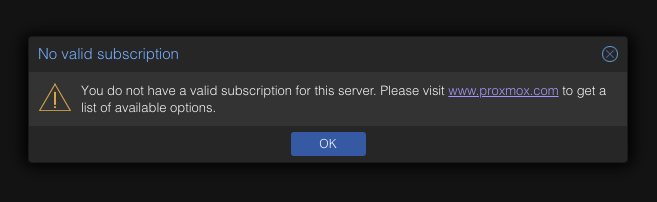
It can be permanently removed with a minor procedure.
Important: Proxmox VE 8 reaches end of life in August 2026
Support for Proxmox VE 8 ends together with its Debian 12 base in August 2026. After that there are no security updates - not through the no-subscription repository either. The current release is Proxmox VE 9.2 (Debian 13 "Trixie").
The instructions below cover both versions; the repository paths differ. If you are still on 8.x: Upgrade Proxmox VE 8 to 9 - and if you would rather not run the upgrade yourself, we can take it on or talk it through in a free intro call.
Table of Contents
- Why the subscription warning appears
- Enterprise repo vs. no-subscription repo
- Switching repositories safely
- Step-by-step: remove the warning for good
- Is it legal and advisable for production?
- What you lose without a subscription
- Conclusion
Why the subscription warning appears
The message does not mean something is broken. Proxmox VE checks via its API at login whether a valid subscription key is configured on the node. If no key is present, the web interface shows the "No valid subscription" dialog on every sign-in.
Importantly, the notice is purely informational. It blocks no feature, no VM and no update - your cluster runs identically with or without a subscription. The only practical catch is that the default repository after installation is the enterprise repo, whose apt update fails with a 401 error without a key. That is why the warning typically shows up right after a fresh Proxmox installation.
Enterprise repo vs. no-subscription repo
Before hiding the warning, pick the right repository so that apt update runs cleanly. Proxmox VE offers three package sources:
- Enterprise Repository (
pve-enterprise,https://enterprise.proxmox.com/debian/pve): especially well-tested, stable updates. Requires a valid subscription and is recommended for production systems. - No-Subscription Repository (
pve-no-subscription,http://download.proxmox.com/debian/pve): free and fully functional. Its packages are less heavily validated and not recommended for production use. - Test Repository (
pvetest): a preview of new features, for test systems only.
Functionally, both main sources install the same software. The difference is the level of testing and the timing of delivery. Without a subscription you use the no-subscription repo, disable the enterprise repo and thereby avoid the 401 error on update.
Switching repositories safely
The most convenient route is the web interface under Datacenter → Updates → Repositories: select the enterprise line and click Disable, then Add and choose No-Subscription.
On the console the path depends on the version.
Proxmox VE 9 (Debian 13 "Trixie") uses the Deb822 format. The enterprise source lives at /etc/apt/sources.list.d/pve-enterprise.sources; disable it and create pve-no-subscription.sources:
Types: deb
URIs: http://download.proxmox.com/debian/pve
Suites: trixie
Components: pve-no-subscription
Signed-By: /usr/share/keyrings/proxmox-archive-keyring.gpg
Proxmox VE 8 (Debian 12 "Bookworm") still uses the classic .list format. Comment out the enterprise line in /etc/apt/sources.list.d/pve-enterprise.list and create a new source:
echo "deb http://download.proxmox.com/debian/pve bookworm pve-no-subscription" \
  > /etc/apt/sources.list.d/pve-no-subscription.list
You only need this variant while you are still on 8.x - that branch ends in August 2026.
Then run apt update - it should now complete without a 401 error. For the version change in detail, see the guide Upgrade Proxmox VE 8 to 9.
Step-by-step: remove the warning for good
The repository controls updates, but the login notice itself lives in the web toolkit's JavaScript file. You hide that call with two commands.
- Create backup of the file & apply patch
sed -Ezi.bak "s/(Ext.Msg.show\(\{\s+title: gettext\('No valid sub)/void\(\{ \/\/\1/g" \
/usr/share/javascript/proxmox-widget-toolkit/proxmoxlib.js
This command comments out the point at which the message is generated.
A backup file (.bak) is created automatically.
Check whether the patch applied: the search expression depends on the proxmox-widget-toolkit code, and that occasionally changes between releases. Compare the file against its backup:
diff /usr/share/javascript/proxmox-widget-toolkit/proxmoxlib.js \
     /usr/share/javascript/proxmox-widget-toolkit/proxmoxlib.js.bak
If diff prints nothing, the expression did not match - the notice will still be there after the restart. In that case search the file for No valid subscription and adjust the expression to the wording actually present.
- Restart the Proxmox proxy
systemctl restart pveproxy.service
- Update web interface
- Reload browser (best to clear cache /
Ctrl+F5) - The warning has now disappeared
Important: the patch does not survive an update of the proxmox-widget-toolkit package. As soon as it is upgraded, proxmoxlib.js is replaced and the message returns. Simply run the sed command again, or automate it with an APT hook under /etc/apt/apt.conf.d/ so it runs after every upgrade.
Proxmox is running - but who keeps it running?
Updates, backups, monitoring and security eat time the moment business-critical VMs depend on it. We run your Proxmox cluster as a managed service: proactive maintenance, high availability, fast response.
Is it legal and advisable for production?
Legally this is clear-cut: Proxmox VE is free software under the AGPLv3. Using the no-subscription repository and editing your local proxmoxlib.js on your own server is entirely permitted. You do not buy a subscription for the right to use the software, but for access to the tested enterprise repository and vendor support.
For home labs, learning and test environments the no-subscription repo is the obvious choice. For production, business-critical clusters we recommend a subscription: you get more thoroughly tested updates, a clear support path and therefore less risk with security-relevant patches. For a breakdown of licensing costs, see How much does Proxmox cost?.
What you lose without a subscription
Without a subscription you give up:
- The enterprise repository with especially stable, validated packages
- Official support from the Proxmox team, with response times depending on the tier
- The guarantee of a vetted update sequence for major releases
What you keep: the full feature set of Proxmox VE - VMs, LXC containers, clusters, high availability, backups and all storage options. That is exactly why removing the warning is uncritical in a home lab, while in production the combination of a subscription and professional Proxmox maintenance means less effort and lower risk.
Conclusion
You can remove the Subscription Notice in Proxmox with just two commands. However, the Enterprise Repository is still recommended for productive environments. For home labs and tests, the Community Repository is the better choice - and is completely free to use.
Do you have questions about Proxmox, virtualization or cluster setups? We support you with installation, operation and optimization. Arrange a consultation now
Next step
Outsource your Proxmox maintenance?
We plan, run and monitor virtualized infrastructure on Proxmox VE - on dedicated hardware, in the cloud or hybrid. Including patch management, backups and CVE monitoring.
Read next: VMware to Proxmox migration · Setting up Proxmox Backup Server · Private cloud for SMEs
Rather have it operated?
You'd rather not run Proxmox yourself? WZ-IT handles setup, operations and maintenance - privacy-focused from Germany.
Enquiry
Build, migrate, or operate Proxmox
We design and maintain Proxmox environments from a single node to an HA cluster, including migration, storage, backup, and ongoing operations.
Frequently Asked Questions
Answers to the most important questions
Because no valid subscription key is configured on the node. Proxmox checks the subscription status via its API at login and shows the dialog on every sign-in to the web interface. The message is purely informational and blocks no features.
Yes. Proxmox VE is released under the AGPLv3 and is free to use. Editing the local proxmoxlib.js on your own server is permitted. A subscription only buys access to the enterprise repository and official vendor support, not the right to run the software.
Yes. As soon as the proxmox-widget-toolkit package is updated, it replaces proxmoxlib.js and the patch is gone. Simply run the sed command again, or automate it with an APT hook under /etc/apt/apt.conf.d/ so it reapplies after every upgrade.
The enterprise repo delivers especially well-tested, stable updates and requires a subscription. The no-subscription repo is free and fully functional, but its packages are less heavily validated and are not officially recommended for production use.
No. For home labs and test environments the free no-subscription repository is sufficient. A subscription mainly pays off for production, business-critical clusters with support and stability requirements.
In the web interface under Datacenter → Updates → Repositories, disable the enterprise repo and add the no-subscription repo. From Proxmox VE 9 (Debian 13 'Trixie') this is done via Deb822 files under /etc/apt/sources.list.d/.
More on Proxmox
- What is Proxmox?
- LXC vs KVM
- Proxmox vs Docker
- Storage: ZFS, Ceph & LVM
- How much does Proxmox cost?
- Proxmox vs VMware
- Migrate from VMware to Proxmox
- Migrate from Hyper-V to Proxmox
- Drawbacks & suitability
- Run Proxmox without a subscription
- Licensing Windows Server on Proxmox
- XCP-ng vs. Proxmox
- Install Proxmox
- Set up Proxmox on Hetzner
- Hardware & sizing
- Upgrade Proxmox VE 8 to 9
- Remove the subscription notice
- Proxmox monitoring: tools compared
- Monitor Proxmox with Zabbix
- GPU on Proxmox: passthrough & vGPU
- Proxmox troubleshooting (coming soon)
- Build an HA cluster with Proxmox
- 2-node cluster with QDevice
- Cluster networking on Hetzner (vSwitch)
- Cluster networking on OVH (vRack)
- Cluster networking on IONOS (VLAN)
- What is Proxmox Backup Server?
- Proxmox Backup Server offsite (pull architecture)
- Encrypted backups with Hetzner Storage Box
- What is Datacenter Manager?
- What is Mail Gateway?
- Proxmox hosting providers compared













