
Fixed-price Proxmox restore test - WZ-IT reviews the primary and external backup paths, performs an isolated restore and documents the achieved recovery point and measured duration. View restore test · Have your PBS off-site architecture built and operated Book a meeting · Learn more about Proxmox Backup Server
The PBS fundamentals explain the backup model. Three core questions decide whether your backups survive a ransomware wave: who has access to what, who initiates the data movement, and how long do data live where? With Proxmox Backup Server (PBS) these can be answered architecturally - through a pull architecture and asymmetric retention between the primary and offsite locations.
This post explains why the sync direction determines the safety of your backups, how to split retention cleanly across two locations, what to consider in the NIS2 context, and which hosting options actually hold up for the external PBS.
Table of contents
- Pull or push: why the sync direction matters
- How the pull architecture works
- What counts as an offsite backup?
- Deduplication: why offsite stays affordable
- Asymmetric retention: short locally, long offsite
- Set up a PBS sync job: remote, pull job, flags and verify
- Hosting options for the external PBS
- 3-2-1-1-0 and the NIS2 context
- Common pitfalls
- Our approach at WZ-IT
- Further reading
For recovery across sites, see DR patterns and runbook.
Pull or push: why the sync direction matters
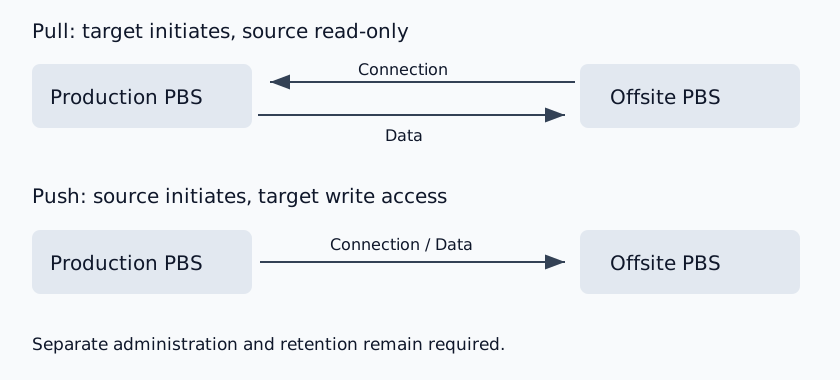
Proxmox Backup Server supports two modes for replication between two PBS instances: pull (the target server actively fetches data from the source) and push (the source server sends data to the target). Technically both reach the same result. Security-wise they are worlds apart.
In a push setup, the production PBS needs credentials with write access to the external PBS. If source credentials are compromised, the possible damage depends on the target permissions: Datastore.Backup allows new snapshots, but does not grant general permission to overwrite or delete existing backups. Deleting snapshots requires the target user to have Datastore.Prune and backup ownership. Broader administrative permissions increase the possible damage. See the PBS permission model.
In a pull setup, the offsite PBS initiates the connection and reads the source. The source needs no target credentials. Separate administration, firewall rules and independent retention limit deletion paths; compromised target credentials still require additional safeguards.
Pull limits permissions on the source. This is an architecture choice, not a blanket vendor recommendation. For push, the PBS documentation recommends a dedicated remote configuration and a restricted remote user for each sync job.
The offsite PBS needs outbound access to the source over TCP 8007; the source firewall permits that inbound connection specifically. TLS and an independently verified certificate fingerprint protect the connection.
How the pull architecture works
A production-grade PBS pull architecture has three components.
The local PBS sits in the production network, ideally integrated into a HA Proxmox cluster. PVE hosts send VM and container backups there. Incremental transfer with deduplication means that after the first full backup only deltas go over the wire.
The offsite PBS sits in a geographically and administratively separated data center. It pulls new snapshots, deduplicates them again into its own datastore, and applies its own retention policy. The only outbound connection it needs is to the source - no inbound connections from the internet.
The sync user is a dedicated API user on the local PBS with only the DatastoreReader role on a specific datastore. Instead of a password we recommend an API token that can be rotated without user-level intervention. This user has no write rights anywhere - even if the token were compromised, the attacker could at most read, not destroy.
During pull, the offsite PBS first downloads the snapshot indexes from the source PBS for each snapshot to be synced. If a referenced chunk already exists in the offsite datastore (because a previous sync brought it in or another VM has the same content), it is not transferred again. Only missing chunks are transferred. Deduplication therefore works over the wire too.
Configuration-wise sync jobs land in /etc/proxmox-backup/sync.cfg, remote definitions in /etc/proxmox-backup/remote.cfg. Both files are versionable and belong in your provisioning pipeline.
What counts as an offsite backup?
"Offsite" is often confused in practice with "external" or "on another server". That is dangerous. A PBS in the same rack as the PVE is off-host, a PBS at the same site but outside the PVE cluster is off-cluster - both help against single-server hardware failures, but not against fire, flood, data center power outages, theft, or a hoster suspending the account.
True offsite requires three separations.
Geographic. Our planning rule is to assess shared power, flood, fire and network risks. A blanket distance in kilometres does not replace a location assessment.
Administrative. Ideally not at the same hoster as the primary system. If you run on Hetzner production, the offsite location should be elsewhere - not because Hetzner sites are unsafe, but because account suspension (delayed payment, compromised hoster credentials) could otherwise take both sites down at once.
Legal. In case of insolvency or a dispute with the primary provider, the offsite data must remain accessible. Provider diversity is also a legal argument.
Choose separate locations and administrative domains; assess privacy requirements against contracts, data flows and the operating model.
Deduplication: why offsite stays affordable
Offsite storage seems expensive at first - until you understand how aggressively PBS deduplicates. The mechanics:
VM backups are split into fixed-size chunks of 4 MiB. Each chunk gets a SHA-256 hash. Identical chunks (e.g. across multiple snapshots of the same VM, or across multiple VMs with the same base image) end up only once physically in the datastore - subsequent snapshots reference the same file.
Container and host backups are split into dynamic chunks whose boundaries are determined by a Buzhash rolling hash over pxar archives. The advantage: a small change in the middle of a large file does not shift the entire chunk layout - only the affected chunk is regenerated.
Incremental with bitmap. For running VMs, QEMU tracks changed blocks via dirty bitmap. PBS reads only those blocks and transfers only the unknown chunks. Important to know: the bitmap lives in RAM. After VM stop, restart, or migration, it is gone, and the next backup must read the entire disk again - but still transfers only unknown chunks. Longer runtime, no extra storage consumption.
Cross-VM dedup. Five VMs with a Debian 12 base share the system files. Three weeks of daily snapshots of the same VM share everything that has not changed. PBS handles this automatically.
As an example, a provider blog describes a user whose NFS backups shrank from 7 TB to just over 1 TB with PBS. How much deduplication achieves depends on the data; the concrete factor per datastore is visible in the WebUI but only updates after a garbage collection run.
A few limits apply. With heavily fragmented databases, a byte update can rewrite an entire 4 MiB chunk. If you need block-level fine-grained deduplication, you need additional storage-level dedup (ZFS dedup or similar). PBS is designed as a backup layer, not as a storage engine.
Asymmetric retention: short locally, long offsite
A PBS quirk that many overlook on first setup: sync jobs are independent of prune settings. As of October 2026, regular pull skips snapshots older than the newest successful snapshot in each backup group in the offsite datastore. If no successful snapshot remains there, available source snapshots can be transferred again.
The rule: retention must be planned in one direction - locally shorter than offsite, never the other way around. If the local PBS prunes after 14 days before the next sync runs, the snapshot is lost offsite.
A sensible split in practice:
Local PBS (short, fast, operational): keep-last 3 plus keep-daily 7. Fast restores for the common cases (accidentally deleted VM, broken update).
Offsite PBS (long, compliance): The official PBS docs show a 10-year strategy: keep-last 3, keep-daily 13, keep-weekly 8, keep-monthly 11, keep-yearly 9. You get day-precise backups in the recent past, weekly retrospectively, then monthly, then yearly - at minimal storage cost thanks to dedup.
Important: the keep-* options are processed in order (last → hourly → daily → weekly → monthly → yearly). Each option only marks snapshots in its own time window that have not yet been marked by an earlier option. If you want to understand the interplay, use the official prune simulator - you can play policies against example data.
Three places where retention can be configured - and this is the most common mistake:
- PBS datastore (Prune & Garbage Collection tab)
- PVE storage configuration (PBS as a storage in PVE)
- PVE backup job
If retention is set in multiple places, all of them apply in parallel - and the most aggressive one wins. The clean solution: set retention only at the PBS datastore (or namespace) and enable "Keep all backups" in the PVE storage configuration. In addition, the PBS user with which PVE writes backups should have no prune or destroy rights - otherwise a compromised PVE can delete its own backups.
By the way, pruning only removes the snapshot reference, not the underlying chunks. Only garbage collection (typically a weekend job) deletes unreferenced chunks after a grace period of 24h plus 5 minutes. Storage is therefore only freed after the next GC run.
Set up a PBS sync job: remote, pull job, flags and verify
A few flags decide between "runs cleanly" and "produces data loss":
--remove-vanished false (recommended for asymmetric retention). When a snapshot is pruned on the source, it should not vanish on offsite. Set to true, the pull job would turn the offsite into a pure 1:1 mirror - destroying the entire retention asymmetry.
--verified-only true syncs only snapshots that have been successfully verified on the source; encrypted-only additionally restricts the selection to encrypted snapshots. Both are particularly relevant when the offsite PBS runs in a less trusted environment (documentation).
--encrypted-only true pulls only client-side encrypted snapshots offsite. If you use client-side encryption with AES-256-GCM - which should be mandatory for offsite storage - this flag prevents unencrypted backups from accidentally leaving the building.
--rate-in <bandwidth> caps the sync speed. With a tight uplink (e.g. 50 Mbps in an SMB connection) it makes sense to cap the sync below the line capacity so daily business is not throttled. The unit is bytes per second: 50 Mbit/s is about 6 MiB/s, and a limit of 4 MiB/s (about 34 Mbit/s) leaves headroom for other traffic. The 20MiB in the Proxmox documentation is a syntax example, not a guideline for narrow uplinks. Tip: schedule sync jobs for night hours.
--ns and --remote-ns map namespaces. One namespace per tenant in the same datastore: separate ACLs, separate prune policies, but shared deduplication. For multi-tenant setups or hosting scenarios this is often the right answer.
--schedule accepts systemd's calendar event syntax: daily 03:30, *-*-* 02:00, Wed 02:30. Sync jobs should run after backup jobs but before prune jobs.
Configuration is split between the source and offsite PBS (PBS docs).
Run on the source PBS: create the user and token, grant read permissions, and retrieve the source fingerprint.
proxmox-backup-manager user create sync@pbs
proxmox-backup-manager acl update /datastore/datastore1 DatastoreReader --auth-id sync@pbs
proxmox-backup-manager user generate-token sync@pbs offsite
proxmox-backup-manager acl update /datastore/datastore1 DatastoreReader --auth-id 'sync@pbs!offsite'
proxmox-backup-manager cert info
Run on the offsite PBS: supply the source token secret and its independently verified fingerprint; replace placeholders before execution. Do not store secrets in shared shell histories.
proxmox-backup-manager remote create source-pbs \
  --host source-pbs.example \
  --userid 'sync@pbs!offsite' \
  --password '<TOKEN-SECRET>' \
  --fingerprint '<SHA256-FINGERPRINT>'
Create the following pull sync job on the offsite PBS as well. These commands follow the PBS 4.2 documentation. Datastores must already exist. On the source, user and token have only DatastoreReader. Configuring the target job requires Remote.Read on /remote/source-pbs/datastore1 and at least Datastore.Backup on /datastore/offsite; a different owner also requires Datastore.Modify. See permissions and sync and token management.
proxmox-backup-manager sync-job create offsite-pull \
  --remote source-pbs \
  --remote-store datastore1 \
  --store offsite \
  --remove-vanished false \
  --verified-only true \
  --encrypted-only true \
  --rate-in 4MiB \
  --schedule '02:30'
The PBS 4.2 documentation also describes server-side encryption during sync: push can encrypt previously unencrypted snapshots before transfer; existing encrypted content remains unchanged. Pull can decrypt with associated keys. This changes the key and trust boundary and is planned separately from the encrypted-only pull example.
For the initial server: set up and connect PBS. For an S3 target: set up and check PBS with Hetzner Object Storage, including limits and recovery.
Hosting options for the external PBS
Five architecture variants, depending on volume, compliance, and budget.
netcup root server with local block storage. Current generation G12.5 with AMD EPYC 9645 and DDR5 ECC RAM. Local block storage up to 8 TB per server, expandable without minimum term. Locations Nuremberg or Vienna. PBS benefits noticeably from local block storage instead of network filesystems - garbage collection and verify become significantly faster. Location in the EU.
Hetzner Storage Box as CIFS mount. Attractive price-wise. With a CIFS mount, check filesystem compatibility and the duration of backup, verification, garbage collection and restore in the specific setup. One possible addition is to use it as a cold layer alongside an offsite target with local block storage.
Managed PBS providers. Specialist providers operate PBS under their respective plans. Check storage, retention, access, key management and export options before ordering; a blanket price range is not reliable.
Own hardware in a second data center. Full control over hardware and connectivity. Whether this is economical depends on capacity, hardware, location, connectivity and operating costs.
S3 datastores are stable since PBS 4.2. PBS can use S3-compatible object storage as a datastore. As of October 2026, PBS 4.2 does not support Object Lock or bucket versioning (Proxmox staff in the forum). An immutable or offline copy is therefore designed through a separate storage or export path rather than forced through WORM rules on the live PBS datastore.
WZ-IT can implement an offsite PBS instance as part of setup and operations. For server resources, see Proxmox hosting.
3-2-1-1-0 and the NIS2 context
The classical "3-2-1" backup rule - three copies, two media, one offsite - is extended in the ransomware era by two slots: 3-2-1-1-0. An additional copy must be immutable or offline (against ransomware), and 0 errors must show up in verify jobs.
A pull PBS architecture covers 3-2-1 elegantly:
- 3 copies: original on PVE storage, backup on local PBS, sync on external PBS
- 2 media: PVE storage and PBS datastore (or two PBS datastores on different storage)
- 1 offsite: the external PBS
The additional immutable or offline copy requires a separate path such as tape or rotating media connected only for the agreed backup process. The method must fit deletion periods, data volume, and recovery objectives.
Verify jobs at 0 errors are not a nice-to-have. A backup that has never been restored or verified is hope - not a backup. Quarterly restore tests of a test VM from the offsite datastore belong on the operations calendar.
In the NIS2 context, backup, recovery, supply chains, and documented risk management may be relevant. Specific applicability and legal assessment depend on the organisation. Technically, a PBS pull architecture can support traceable data paths, retention and verification results as well as defined RTO/RPO and explicitly agreed restore tests.
For deeper context: we wrote at length about "Linux Kernel Vulnerabilities 2026: Why Patch Management Is Now a Board-Level Issue" - that post details the NIS2 context in depth.
Check the offsite copy with an isolated PBS restore test. The independently stored encryption key must also be available.
Common pitfalls
Common pitfalls:
Latency eats bandwidth. Sync speed depends not only on uplink but also on round-trip time between source and destination. With high latency or packet loss, TCP congestion control throttles aggressively. Workaround: WireGuard tunnel with BBR congestion control. The bug tracker entry 4182 documents the issue in detail.
Initial sync locally. The first sync can take days for several terabytes over a 50 Mbps uplink. One option is to set up the offsite PBS locally, run the first sync on the local network, and then move the machine to the remote data center. Configs are then adjusted to the new IP, the datastore is already filled. Alternatively: removable datastores for the initial sync via external disk.
Set up verify jobs - on both sides. On the source to catch bit rot early. On the offsite to know that the sync has not silently transferred broken chunks. Verify is IO- and CPU-intensive; the schedule should sit between GC and sync.
Store encryption keys offsite. If backups are client-side encrypted and the key only lives on the destroyed PVE, the backups are useless. Keys belong in a cloud password manager (Bitwarden, 1Password) plus an offline copy at a second location - in an emergency a printed QR code in a safe deposit box. Yes, really.
Prepare DNS failover for restore. In a disaster recovery case the local PBS is often gone too. Restore must work directly from the external PBS to a freshly installed PVE. That means: external PBS must be reachable, credentials must be available (password manager with offline backup), encryption keys must be safely stored, restore walkthrough must be documented. Restore testing is a duty, not a courtesy.
Use namespaces for multi-tenancy. One namespace per customer or workload class in the same datastore: separate ACLs, separate prune policies, separate sync filters. But: if the same VM is backed up to two namespaces, the dirty bitmap is lost - the entire disk must be re-hashed each backup. Practically: a VM lives in exactly one namespace.
Three retention places - one source of truth. We mentioned it above, but it is so important that it deserves a second hearing: retention only at the PBS datastore. PVE job at "Keep all backups". Otherwise you mark away snapshots you hoped to have offsite.
Mind bandwidth asymmetry. Consumer connections often have 1 Gbps down, 50 Mbps up. Initial sync from the offsite back (in a DR case) is fast - sync to offsite is slow. With business connections usually symmetric, but worth checking.
Our approach at WZ-IT
At WZ-IT we build and operate PBS pull architectures as an integral part of our Proxmox & Private Cloud services. Three stations:
Architecture workshop (Proxmox consulting). Together we clarify data volume, RTO/RPO requirements, compliance obligations (NIS2, ISO 27001, BSI C5), and bandwidth realities. Output: an architecture document with hosting recommendation, retention policy, encryption strategy, and restore runbook.
Building the pull architecture (PBS setup and operations). Local and external PBS instances aligned with the recovery objectives, a dedicated sync user with the DatastoreReader role, separate key storage, and defined verification jobs. Restore tests and infrastructure as code are explicitly agreed where required.
Operations with defined service levels (Proxmox maintenance). We monitor agreed sync, garbage-collection, and verification jobs and assess security advisories for PBS, the host system, and the kernel. Restore tests, reports, and further recovery work are confirmed as a separate scope where required.
For environments that require evidence, data paths, retention, encryption, verification results, and completed restore tests can be documented within the agreed scope. Whether these records satisfy a specific regulatory requirement is assessed separately.
Further reading
- PBS fundamentals
- PBS restore test: guide
- Proxmox Backup Server vs. Veeam - which backup solution for Proxmox VE, with a cost example
- Proxmox Backup Server (hub) - overview of PBS, S3 backend, and managed-service options
- Proxmox Disaster Recovery - RTO/RPO, failover runbooks, and DR drills for the entire cluster
- Proxmox Security Hardening - assess management access, roles, networking, logging, and update paths
- Linux Kernel Vulnerabilities 2026: Patch Management Board-Level - the NIS2 context in detail
- CVE Monitoring for Self-Hosted Software - how to respond structurally to CVE disclosures
- PBS 4.2 S3 Storage Stable - S3 datastores and their operational boundaries
Planning a PBS offsite setup or looking to assess your current backup architecture? We clarify pull or push, local or external PBS, S3 or a separate offline copy, and define the required assessment and operating scope.
Book a free backup architecture review · Learn about PBS · Proxmox hub
For an external backup destination, PBS hosting describes the individually agreed offsite option.